
eBiz Portal Login 2026 – Your Gateway to Punjab Business Registration & Schemes
Running between government offices with stacks of papers, waiting in endless queues, dealing with unclear requirements that change every visit. This used to be normal for anyone trying to register a business in Punjab. One office wants your CNIC. Another demands proof you already visited the first office. A third office only opens two hours daily.
Those frustrating days are mostly gone. The Ebiz Punjab Portal changed how business registration actually works. Instead of physical visits, you handle everything through eBiz Portal Login from your phone or computer. One account gives access to registrations, scheme applications, and status tracking without leaving your home.
What eBiz Portal Login Actually Does for Business Owners
The login system isn’t just a website where you enter credentials. It’s a complete digital gateway connecting you directly to multiple government departments that previously required separate visits, separate applications, and separate headaches.
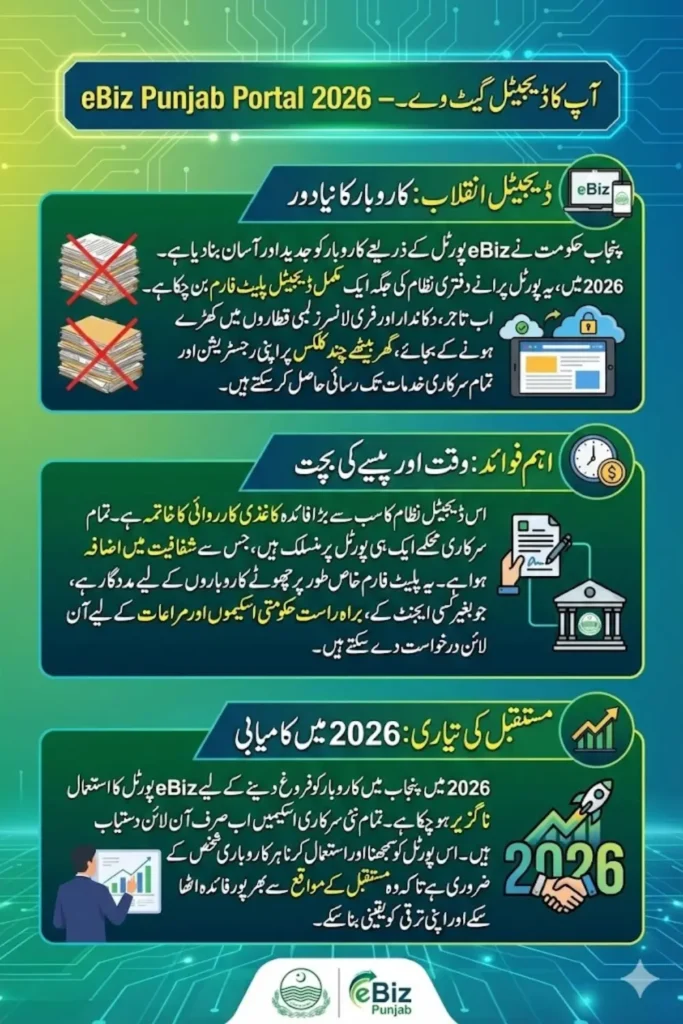
After logging in, your dashboard displays every service you need in one centralized location. Business registration, partnership firm setup, scheme applications, document uploads, payment processing, and application tracking all happen through the same interface.
This single-window approach solves real problems:
Eliminates department-to-department confusion
Previously, each department had different procedures, forms, and requirements. You’d complete one application perfectly, then discover another department wanted completely different documents in a different format.
Removes dependency on agents and middlemen
Without digital access, many business owners hired agents who promised to “handle everything” for hefty fees. The portal makes these unnecessary because you complete applications yourself following clear instructions.
Creates permanent digital records
Paper applications get lost. Files disappear. Departments claim they never received your submission. Digital records prevent these problems because everything stays in the system with timestamps and confirmation receipts.
Saves actual money on travel and time off work
Multiple office visits mean transportation costs, taking days off work, and losing business income. Online access cuts these hidden expenses completely.
Who Actually Needs eBiz Portal Access in 2026
The portal serves anyone involved in business activities across Punjab, from first-time entrepreneurs testing small ideas to established companies expanding operations.
New startup founders launching their first venture
Young entrepreneurs starting online stores, service businesses, or small manufacturing operations use the portal for initial business registration and accessing startup support schemes.
Existing business owners expanding or updating records
Companies adding partners, changing addresses, or updating ownership details handle modifications through the portal without restarting entire registration processes.
Freelancers formalizing their operations
Independent professionals moving from informal work to registered businesses use the portal for sole proprietorship registration.
Partners forming new business entities
Multiple people starting businesses together register partnerships (AOPs) through the portal, uploading partnership deeds and allocating ownership shares digitally.
One important clarification: the portal serves only businesses operating or planning to operate in Punjab. Federal registrations or businesses based in other provinces use different systems.
Creating Your eBiz Portal Account for the First Time
Before you can log in, you need to create an account. The registration process verifies your identity through multiple channels to prevent fake accounts and ensure security.
Registration Requirements
Valid CNIC issued by NADRA
Your national identity card must be current and active. The system cross-checks details with NADRA databases during registration.
Active mobile number registered on your CNIC
Use only mobile numbers linked to your CNIC through biometric verification. Unregistered numbers won’t receive verification codes.
Working email address you actually check
Login credentials, application updates, and important notifications arrive via email. Use an email you access regularly, not an old forgotten account.
Stable internet connection during registration
Complete registration in one sitting. Starting, stopping, and restarting can create duplicate incomplete applications that complicate verification.
Step-by-Step Account Creation
Access the official eBiz Portal website
Only use the legitimate government portal. Fake websites steal personal information. Verify the URL carefully before entering any data.
Click on new user registration
The registration option appears prominently on the homepage. Don’t try to log in before creating an account.
Enter CNIC and personal information
Provide your 13-digit CNIC number, legal name exactly as it appears on your card, current residential address, and contact details.
Verify mobile number through OTP
The system sends a one-time password to your registered mobile number. Enter this code to confirm ownership.
Check email for login credentials
After successful verification, login details arrive in your email inbox within minutes. Check spam folders if nothing appears.
Set a secure password
Change the temporary password to something strong but memorable. Mix letters, numbers, and symbols for security.
Complete eBiz Portal Login Process
Once your account exists, logging in becomes straightforward. The process takes seconds if you remember your credentials.
Navigate to the official portal homepage
Bookmark the correct URL to avoid typing it repeatedly and risking fake websites.
Enter your registered User ID
This is usually your CNIC number or the email address you provided during registration.
Provide your password
Type the password you set after account creation. The system is case-sensitive, so check caps lock.
Access your personal dashboard
After successful login, you land on your dashboard showing available services, pending applications, and important notifications.
Understanding Your Dashboard After Login
The dashboard is where everything happens. Its layout organizes services logically, making navigation intuitive even for first-time users.
| Dashboard Section | What You Find | Primary Use |
|---|---|---|
| Profile Management | Personal information and contact details | Update address, phone, email |
| Available Schemes | Current government programs | Browse and apply for assistance |
| Active Applications | Submitted forms under review | Track progress and status |
| Document Library | Uploaded files and certificates | Store and retrieve documents |
| Payment History | Transaction records and receipts | Review fees and confirmations |
The interface remains consistent across devices. Whether you access from a smartphone, tablet, or computer, the layout adapts while keeping functionality identical.
Applying for Punjab Government Business Schemes
Scheme applications happen directly through your logged-in dashboard. The portal lists all active programs with clear eligibility criteria and required documentation.
Browse available schemes by category
Programs are organized by business type, industry sector, and support level. Filter options help find relevant schemes quickly.
Read complete eligibility requirements
Each scheme clearly states who qualifies based on business age, size, revenue, and other factors. Don’t waste time applying for schemes you don’t meet criteria for.
Prepare required documents in advance
Scheme applications typically need business registration certificates, CNIC copies, partnership deeds, bank statements, and business plans. Gather these before starting applications.
Upload documents in correct formats
The system accepts PDF, JPG, and PNG files. Keep file sizes under specified limits. Blurry or incomplete scans cause rejection.
Submit and save confirmation number
After submission, you receive a unique reference number. Save this for tracking and future inquiries.
Tracking Application Status Without Office Visits
Real-time tracking eliminates the guesswork that plagued old systems. You know exactly where your application stands without calling helplines or visiting offices.
Log into your dashboard
Access the active applications section showing all submitted forms.
Check current processing stage
Applications display status like “Under Review,” “Additional Documents Required,” “Approved,” or “Rejected” with explanations.
Respond to requests immediately
If departments need additional information or clarification, notifications appear in your dashboard and arrive via email.
Download approval certificates digitally
Approved applications generate downloadable certificates you can print or save electronically.
Common Login Problems and Quick Solutions
Despite the portal’s user-friendly design, technical issues occasionally occur. Most problems have simple fixes.
Forgotten Password Recovery
Click “Forgot Password” on login page
Don’t create new accounts or contact support immediately.
Enter registered email address
Use the exact email from your original registration.
Check inbox for reset link
Password reset instructions arrive within minutes. Check spam folders if nothing appears.
Create new password following requirements
New passwords need minimum length, special characters, and can’t match recent passwords.
Email Verification Not Received
Wait 5-10 minutes before assuming failure
Email delivery isn’t always instant.
Check spam and junk folders
Automated emails often get filtered incorrectly.
Verify email address was entered correctly
A single typo sends verification to the wrong address.
Request resend through portal support
If genuinely not received, the system can trigger new verification emails.
Security Best Practices for Portal Usage
Your eBiz account contains sensitive business information and connects to official government records. Protecting login credentials is essential.
Never share your password
Not with partners, employees, or family members. Create separate accounts for different people.
Use unique passwords
Don’t reuse passwords from other websites. A breach elsewhere could compromise your eBiz access.
Log out after completing tasks
Especially on shared or public computers. Don’t leave accounts open.
Enable two-factor authentication if available
Extra security layers prevent unauthorized access even if someone steals your password.
Regularly update contact information
Keep mobile numbers and email addresses current so you receive important security notifications.
Benefits Beyond Simple Registration
The portal’s value extends beyond initial business registration. It becomes a long-term tool for managing your business relationship with government departments.
Automatic scheme notifications
The system alerts you when new programs launch that match your business profile.
Centralized document storage
All uploaded certificates, approvals, and correspondence remain accessible for future reference.
Simplified renewal processes
Annual renewals and updates require minimal effort because historical data is already in the system.
Direct communication with departments
Ask questions and receive clarifications without physical visits or phone tag.
Frequently Asked Questions
How do I create an eBiz Portal account in 2026?
Visit the official portal, click new registration, enter your CNIC and contact details, verify your mobile number through OTP, and check your email for login credentials. The process takes about 5-10 minutes.
What if I forget my eBiz Portal password?
Click “Forgot Password” on the login page, enter your registered email address, and follow the reset instructions sent to your inbox. You can create a new password immediately.
Can I access eBiz Portal from my mobile phone?
Yes, the portal works on smartphones, tablets, and computers. The interface adapts to different screen sizes while maintaining full functionality. Any modern browser works fine.
How long does application approval take through eBiz Portal?
Processing time varies by service type. Simple registrations typically complete within 5-7 days. Scheme applications requiring detailed review may take 2-3 weeks. Track status through your dashboard.
Is eBiz Portal Login free or does it charge fees?
Creating an account and logging in is completely free. Some services like business registration or partnership deed filing have government fees, but portal access itself costs nothing.
Final Thoughts
eBiz Portal Login has genuinely transformed business registration in Punjab. What used to take weeks of office visits, stacks of paperwork, and significant expense now happens in days through a simple online process.
For anyone starting or managing a business in Punjab during 2026, learning to use this portal isn’t optional. It’s become the primary gateway to government services, scheme applications, and official registrations.
Create your account early, even if you don’t need services immediately. Having verified access ready means you can act quickly when opportunities arise or requirements change. The portal exists to serve you, making business operations smoother and government interaction less painful.